
Blog
How to confirm SMT machine spare parts fit your machine revision
A matching part number is a useful starting point, but it does not always confirm compatibility with your SMT machine’s revision. Differences in hardware, firmware, connectors, or mounting points can turn a routine replacement into costly downtime. Before ordering SMT Machine Spare Parts, verify the machine model, serial number, revision details, and any manufacturer-approved substitutions. The aim is not simply to find a component that looks right. It is to establish that the replacement will work with the machine as it is configured today.
That distinction matters on an established PCB assembly line. A placement machine may have received a replacement head, an upgraded controller, or a field-installed feeder interface since commissioning. The model on the nameplate remains unchanged, while the configuration relevant to a spare-part purchase has moved on.
Identify the machine you have, not just the model you bought
Start with the machine nameplate, then check the service records. Record the complete model designation, serial number, and any configuration or revision identifiers available in the manufacturer’s documentation. Do not shorten the model name for convenience: a suffix may distinguish a head arrangement, machine variant, or equipment generation that affects part selection.
The machine serial number is especially useful when the manufacturer’s parts catalogue or service bulletin defines an applicability range. A replacement listed for one serial range may not apply to another, even when both machines carry the same commercial model name. Where documentation gives a serial-number break, use it rather than assuming that a newer part fits every earlier machine.
Next, identify the assembly receiving the part. For a nozzle holder, that means the installed placement head. For a drive, it means the relevant axis and controller arrangement. For a feeder-interface board, it means the feeder station and its associated electronics. Assembly identity can be more decisive than the overall machine model.
If maintenance records show an upgrade, include its kit number or service reference. If the records are incomplete, tell the supplier that the configuration is unverified. An explicit gap is safer than a confident but outdated equipment description.
Separate the ordering number from the markings on the component
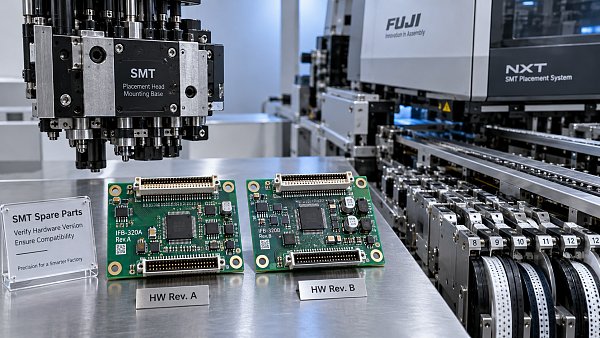
A removed component may carry several identifiers: an equipment manufacturer’s spare-part number, a component maker’s model number, a board assembly number, and a hardware revision. These do not necessarily serve the same purpose. A number printed on a bare circuit board, for example, may identify the PCB design rather than the fully populated, programmed assembly sold as a service part.
Transcribe every relevant marking exactly, including suffixes, separators, and revision letters. Then establish which identifier the supplier is quoting against. “Same board number” is not enough if the machine needs a particular assembly variant, firmware load, or interface configuration.
The installed part is valuable evidence, but it is not automatically the correct specification. If the machine has had recurring alarms, intermittent communication faults, or a poorly documented previous repair, cross-check the installed component against the machine-specific parts list. Otherwise, a new purchase may simply repeat an earlier selection error.
Treat supersession as a compatibility question
When an old number has been replaced by a new one, ask whether the replacement is direct, conditional, or part of an upgrade kit. A manufacturer-approved substitute may require an adapter harness, a bracket, a parameter change, or a software update. Approval for a particular configuration should not be read as universal interchangeability.
Also check the direction of substitution. Documentation approving a newer assembly in place of an older one does not necessarily approve the older assembly in a machine designed for the newer version. Request the applicable catalogue entry, service bulletin, or written manufacturer confirmation when that distinction affects the order.
Check compatibility at the interfaces where mistakes become expensive
The right checks depend on the component. A passive mechanical part does not need the same review as a servo drive or vision controller. Focus on the interfaces that determine whether the replacement can be installed, operated, and calibrated.
- Mechanical parts: Compare mounting-hole locations, locating features, shaft or bore dimensions, operating clearances, and orientation. For moving assemblies, check the specified travel and any alignment requirements.
- Electrical assemblies: Verify supply requirements, connector identification, pin assignments, grounding arrangements, and signal interfaces against approved documentation. Matching connector shells do not prove matching wiring.
- Pneumatic components: Confirm port arrangement, valve function, operating-pressure requirements, and coil specification where applicable. Physical installation alone does not establish correct actuation.
- Control and vision hardware: Check hardware revision, supported software or firmware, communication interface, and any required configuration or calibration files.
Consider a replacement axis motor. It may fit the bracket and accept the existing connector, yet still use a different feedback arrangement or require a different drive configuration. That possibility is a reason to consult the motor-and-drive combination specified for the machine, not a reason to experiment with settings until the alarm disappears.
Placement-related components deserve another distinction: installation fit versus process suitability. A nozzle can attach correctly but be unsuitable for the package being handled. A replacement camera can communicate with the machine but still require the specified optical setup and calibration before inspection or placement performance is evaluated. This matters when assembling semiconductor packages, where pickup, recognition, and placement are separate demands.
Do not modify connectors, mounting features, or safety-related wiring merely to make a questionable spare fit. If modification is required, it should be supported by an approved retrofit procedure, not improvised during a breakdown.
Firmware compatibility needs a specific answer
For electronic spare parts, “compatible with this model” leaves too much unresolved. Ask whether the offered hardware supports the machine’s installed software version and whether it arrives with the necessary firmware. Depending on the assembly, replacement may also involve restoring parameters, loading configuration data, or completing a manufacturer-defined initialization procedure.
Before removing a controller or drive, preserve the relevant configuration using the approved service method, where available. Record software versions and existing parameter references. A backup is useful, but it does not establish that every stored setting is valid for a different hardware revision.
Avoid treating a machine-wide software upgrade as a harmless workaround. It may affect other installed assemblies or production settings. If the proposed replacement requires an update, obtain the prerequisites and commissioning procedure before ordering. The real decision is whether the whole change can be completed safely within the available maintenance window.
Give the supplier enough evidence to confirm the actual configuration
A useful enquiry is a short technical record, not simply a request for price and delivery. Include the machine identity, receiving assembly, exact installed-part markings, relevant software versions, and known upgrade history. Add the drawing or catalogue reference used for selection, if available.
Then ask the supplier to identify the exact part being offered and the basis for compatibility. Keep authenticity, condition, and fit as separate questions. An original part can still be the wrong revision. A used assembly can be the correct revision but need further condition checks. Neither issue is resolved by a broad description such as “for this machine series.”
A precise confirmation request might read: “Please confirm that the quoted assembly applies to this machine serial number and installed head revision, and identify any required harness changes, firmware updates, parameter work, or calibration.” That gives the supplier a defined question to resolve.
SMT MALLS focuses on SMT/THT assembly equipment, original machine spare parts, and complete PCB assembly line solutions. When sourcing through a supplier with that scope, provide the assembly-level information as well as the machine model. Broader equipment knowledge can support the enquiry, but it does not replace configuration-specific evidence.
Make the purchasing decision around the whole replacement job
A direct replacement and an approved upgrade are different maintenance jobs. The upgrade may be a reasonable option when the original part is unavailable, but its quoted price should not be considered separately from adapters, service work, software requirements, and commissioning time.
Use a practical release rule: order when machine applicability, part identity, and installation requirements are resolved. Hold the order when a suffix is unexplained, the serial-number range is uncertain, or the supplier cannot clarify a required firmware change. Urgency makes those unresolved details more consequential, not less.
Keep the supplier’s confirmation with the purchase record. If compatibility is conditional, put those conditions into the maintenance plan before the part arrives. Also clarify the supplier’s process for handling a mismatch; do not assume return eligibility or installation support.
Confirm fit again before releasing the machine to production
On receipt, compare the delivered identifiers and revision markings with the approved quotation before installation. Follow the machine manufacturer’s isolation, electrical-safety, and electrostatic-discharge procedures as applicable. A discrepancy at this stage should stop the replacement until it is explained.
After installation, use the prescribed checks for the affected assembly. These may include initialization, homing, communication checks, pneumatic operation, alignment, or calibration. Successful power-up is only one checkpoint. A placement-head repair, for instance, needs the relevant pickup and placement verification before normal production resumes.
Update the equipment record with the installed part number, hardware revision, software changes, and completed acceptance checks. The next enquiry for SMT Machine Spare Parts should start from that verified configuration. If compatibility still depends on an undocumented assumption, resolve it before the machine returns to the line.


GET A FREE QUOTE
Simply fill in the information to get a free quote! Our professional team customizes photovoltaic solutions for you, provides accurate quotes, and rejects hidden consumption!